
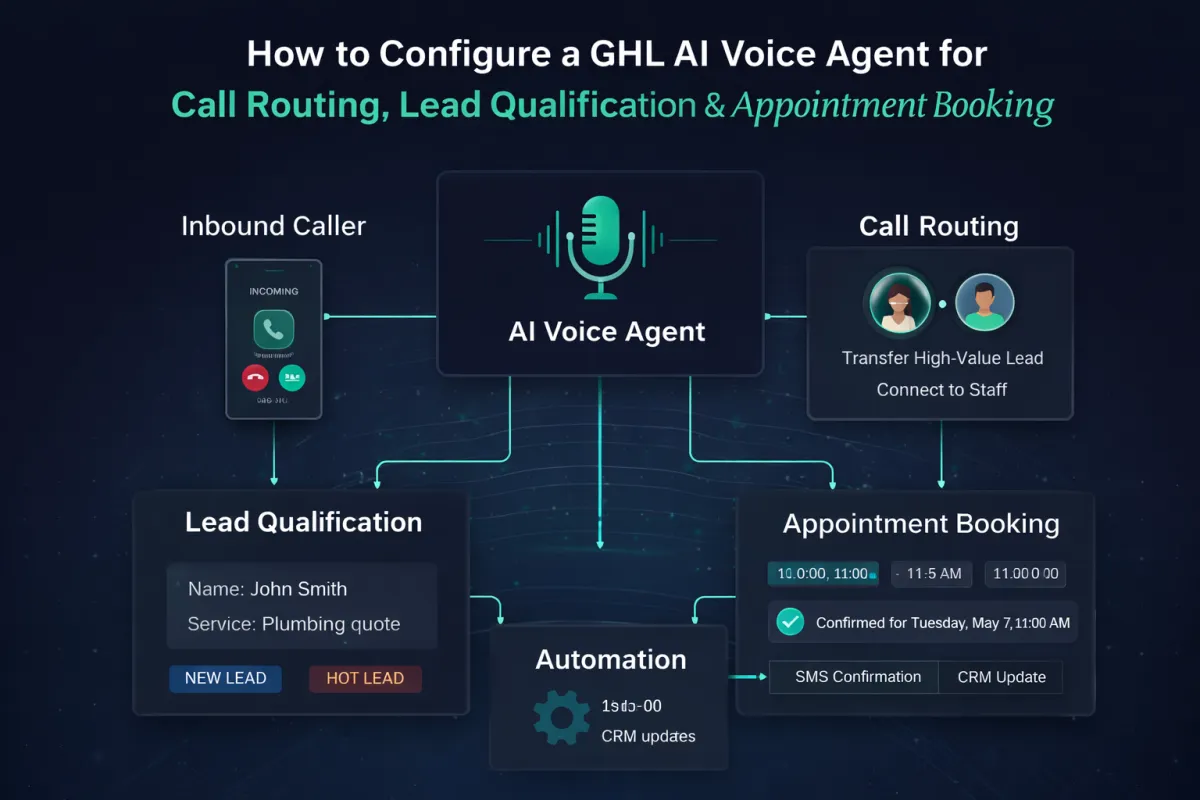
How to Configure a GHL AI Voice Agent for Call Routing, Lead Qualification & Appointment Booking
Step-by-Step: Configure GHL’s AI Voice Agent for Call Routing, Lead Qualification and Appointment Booking
Most businesses install GoHighLevel and never realise what it can actually do.
They add forms.
Maybe a pipeline.
Sometimes a chatbot.
But the real shift happens when your business stops waiting for calls and starts handling them automatically.
A properly configured AI Voice Agent becomes:
→ your receptionist
→ your lead qualifier
→ your booking assistant
→ your first sales conversation
All running 24/7.
This guide walks through the exact implementation process we use inside Lead IT Lab.
No theory. Just setup.
What the AI Voice Agent Actually Does
Before building anything, understand the architecture.
A correctly configured Voice AI Agent should:
Answer inbound calls automatically
Understand natural conversation
Qualify the caller
Route calls intelligently
Book appointments directly into your calendar
Trigger CRM automations
Hand over to a human when required
Think AI receptionist, not chatbot.
System Architecture (How It Works)
The Voice Agent sits at the centre of your backend:
Inbound Call → AI Voice Agent → Decision → Action
Possible outcomes:
Books appointment
Transfers call to staff
Captures lead details
Sends follow-up automation
Ends call politely
Everything connects through GHL’s CRM and workflows.
Step 1: Access the Voice AI Agent Builder
Inside your GHL sub-account:
Settings → AI Agents → Voice AI Agents
Click:
Create Agent
You’ll configure four core areas:
Agent Settings
Knowledge & Training
Actions & Routing
Automation & Testing
Step 2: Configure Core Agent Settings
Start with identity and behaviour.
Agent Name
Use a human name.
Examples:
Sarah
Emma
Reception
Front Desk
Human naming increases trust immediately.
Voice & Personality
Choose:
Natural voice tone
Conversational style
Calm pacing
Avoid robotic delivery.
The goal is professional receptionist, not AI demo.
Response Timing
Set a natural pause before replies.
Recommended:
→ 1–2 second delay
Instant responses feel artificial on phone calls.
Operating Mode
Enable:
Autopilot / Autonomous handling
Continuous conversation
This allows the agent to manage full calls without intervention.
Step 3: Build the Knowledge Base (The Brain)
Most AI agents fail here.
Businesses connect a website URL and stop.
That produces weak performance.
Instead, create a structured knowledge base.
Inside Agent Training → Knowledge Base:
Add rich text containing:
Business overview
Services offered
Pricing ranges
Locations served
Opening hours
Ideal client profile
Common questions
Booking instructions
Do not rely purely on website scraping.
Direct text = faster responses + better accuracy.
Example Knowledge Structure
Include sections like:
About the Business
Who you help and how.
Services
Clear list with short explanations.
Who We Work With
Helps qualification decisions.
Booking Rules
Appointment length
Availability logic
Emergency handling
This becomes the agent’s operational memory.
Step 4: Define Agent Goals (Critical Step)
Now you tell the AI what success looks like.
Inside Agent Goals, define:
Primary Objective
Qualify callers and book an appointment when appropriate.
Secondary Objectives
Capture contact details
Route urgent calls
Answer common questions
Transfer complex requests to staff
Without clear goals, AI becomes conversational but ineffective.
Step 5: Configure Call Routing Logic
This is where the Voice Agent becomes powerful.
Create decision paths based on conversation outcomes.
Route 1 — Appointment Booking
If caller:
wants service
meets criteria
is ready to proceed
→ AI books directly into GHL calendar.
Enable:
Single calendar or multi-calendar routing
Real-time availability checking
Confirmation message
Recommended:
Allow AI to complete booking conversationally rather than sending links.
Conversion rates are higher.
Route 2 — Lead Qualification
Before booking, the AI should ask qualifying questions:
Examples:
What service do you need?
When are you looking to start?
Is this for home or business?
Location?
These answers can automatically:
→ update CRM fields
→ apply tags
→ move pipeline stages
Your CRM gets organised automatically.
Route 3 — Human Transfer
Enable human handover when:
Caller requests a person
High-value lead detected
Complex issue arises
AI lacks information
Configure:
Transfer To → User
Select staff member or department.
Add a transition message like:
“Let me connect you with a team member now.”
Route 4 — Call Routing by Intent
You can also route based on keywords:
Support request → Support team
Sales enquiry → Booking flow
Existing client → Priority line
This replaces traditional phone trees.
No menus. Just conversation.
Step 6: Enable Appointment Automation
After booking, trigger backend automation.
Inside Post-Booking Actions:
Enable:
Workflow trigger
Confirmation SMS
Email confirmation
Reminder sequence
Pipeline stage update
The AI should never just book and stop.
Every appointment should start an automated journey.
Step 7: Connect CRM Data Capture
Configure Contact Fields so the AI updates records automatically.
Examples:
Service requested
Budget level
Lead source
Urgency
Qualification status
Result:
Your CRM fills itself during conversations.
No manual data entry.
Step 8: Configure Follow-Up Behaviour
One of the most underused features.
Enable AI follow-ups when:
Caller hangs up early
Booking not completed
Information requested but not confirmed
Example automation:
→ AI sends SMS
→ Continues conversation
→ Recovers lost leads
Most sales happen after follow-up, not first contact.
Step 9: Add Stop Conditions
Prevent runaway conversations.
Define phrases such as:
“Thanks, goodbye”
“That’s all”
“I’ll call back later”
When detected:
→ AI ends call politely.
This protects usage costs and maintains professionalism.
Step 10: Test the Voice Agent Properly
Do not skip testing.
Run real scenarios:
New customer enquiry
Price question
Appointment request
Wrong number
Angry caller
Human transfer request
Your goal is to break the system before customers do.
Then refine:
Knowledge base
Goals
Responses
Routing logic
Every live conversation improves performance.
Step 11: Monitor the AI Dashboard
Inside the AI Agent Dashboard track:
Calls answered
Appointments booked
Time saved
Actions triggered
Conversation success rate
This becomes powerful proof for ROI.
Most businesses discover their AI receptionist handles more enquiries than staff ever could.
Where Voice AI Delivers the Biggest Impact
When deployed correctly, the AI Voice Agent replaces:
Missed calls
Voicemail black holes
Manual scheduling
Reception bottlenecks
Lead response delays
Instead, your backend becomes structured:
Calls arrive.
AI qualifies.
Calendar fills.
Automations run.
Without anyone touching it.
The Real Advantage Most Businesses Miss
GoHighLevel isn’t just CRM software.
It’s an operational system.
The Voice AI Agent is simply the front door.
When combined with:
CRM structure
Automation workflows
Chat widgets
Revenue attribution
You move from handling leads manually to running a backend that works continuously.
That’s the difference between owning software and owning a system.